Nightly benchmarks
Logos admins enable or disable a nightly schedule for each model/worker pair on Model Details → Performance. Both actions require confirmation. Schedules show the model and concrete parameter values to be tested, in the Run benchmark view with its manual benchmark editor. Automatic serving limits use explicit trial configurations. The preview reflects the worker's current settings; the scheduler builds the plan again when the nightly run starts.
Schedules are off by default and persist in PostgreSQL. The nightly plan is independent of the manual benchmark editor. Disabling a schedule cancels its active run and restores the worker before it returns to production.
Enable, inspect and disable a schedule
See the illustrated admin walkthrough for screenshots of the plan and both confirmation dialogs.
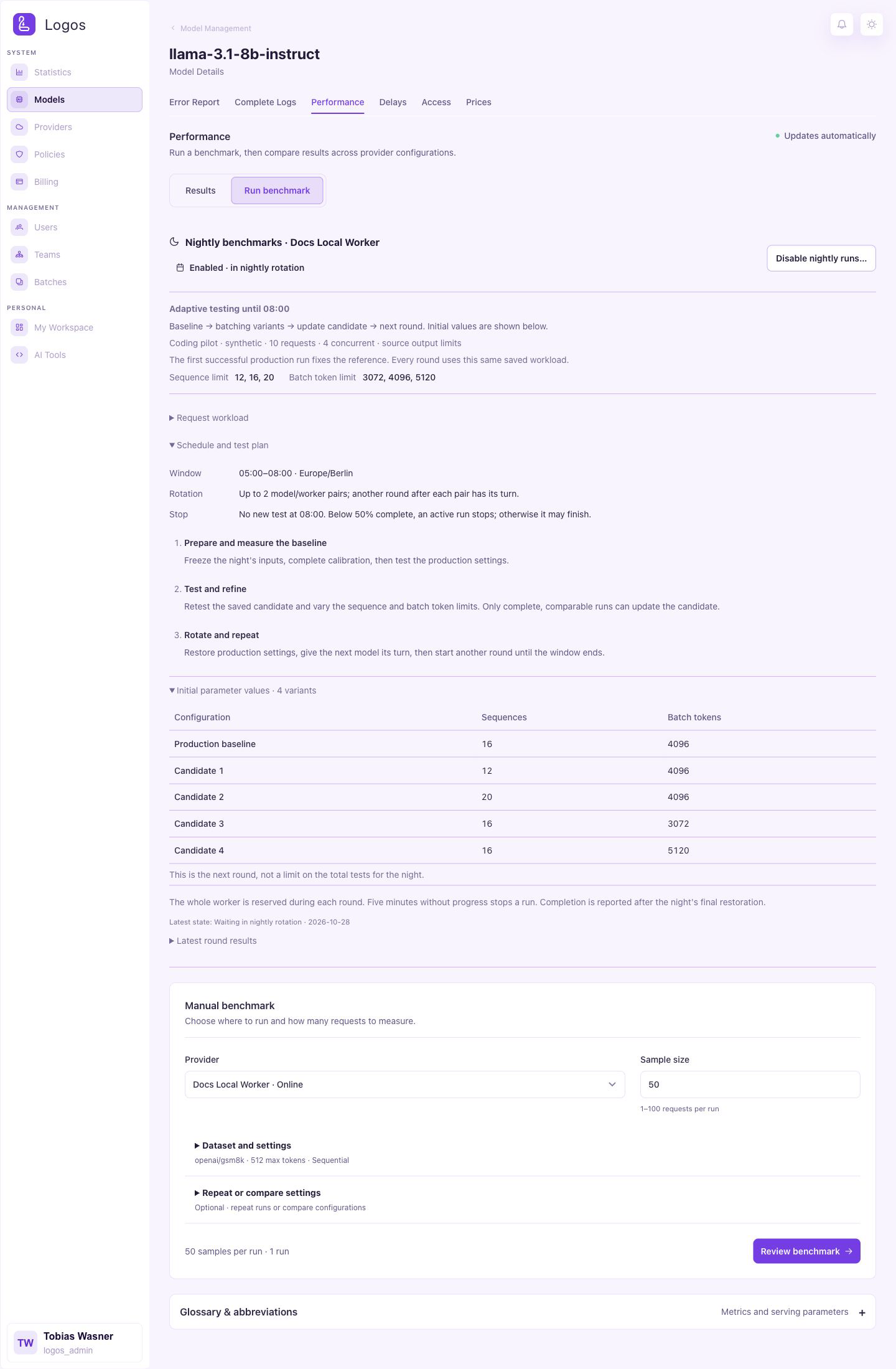
- Sign in as a Logos Admin and open Models.
- Open the model's Model Details → Performance tab.
- Select Run benchmark and find Nightly benchmarks for the intended worker.
- Expand Schedule and test plan.
- Select Enable nightly runs…, then confirm Enable nightly runs.
- Check that the card shows Enabled · in nightly rotation.
The schedule persists after a page reload or browser close. To remove the pair from rotation, select Disable nightly runs… and confirm Disable nightly runs. Cancelling either dialog leaves the saved state unchanged. Activation requires an updated, connected worker. Run admission also checks the lane and the other available workers.
The card shows a plan for this pair, not a guaranteed reservation for tonight. The scheduler selects eligible pairs at runtime. Use Manual benchmark for the dataset editor and question previews. These controls configure manual runs. They do not alter the nightly workload.
The next day, expand Latest round results and inspect each configuration's outcome, attempt and benchmark ID. Use the performance comparison below for successful measurements. A finished plan can contain failed configurations; review individual outcomes before comparing throughput.
Results
Results shows the run, model, changed parameters, measurement times and output throughput. New nightly variants link to the production baseline from the same round. Before shows this baseline. After shows the measured result. Change shows the percentage difference. A dash means the value or baseline is unavailable. Historical timestamps are not reconstructed. Expand Charts and comparison or Run details and saved configurations for more information.
Automatic pair rotation
Each night admits at most 2 enabled model/worker pairs, one after the other. Pairs without a previous attempt come first, followed by the oldest previous attempt. The pair ID determines the initial order when previous attempt dates match. After a restored round, the pair waits behind the other admitted pair. The scheduler skips unavailable pairs before admission; they do not consume a slot. The scheduler excludes disabled pairs.
The quota counts admitted pairs, including failed or cancelled plans. All parameter configurations, further rounds and bounded retries belong to the same pair's slot. The count persists across application restarts and disabling/re-enabling a schedule cannot reset it. The next Berlin calendar date has a fresh quota.
The 08:00 admission cutoff can leave fewer than 2 pairs tested. Remaining pairs keep their priority for the next night. Recovery of an interrupted worker always happens before selection, even when tonight's quota is already full.
After a successful round, the scheduler stores the candidate and restores production settings. It then gives the other admitted pair its turn. Further rounds use the same saved inputs and refine the candidate until 08:00. The daily quota limits distinct pairs, not rounds. A failed baseline or a round without successful variants does not schedule another round. Disabling a schedule stops further rounds. Pending recovery always takes priority.
Time and failure policy
All times use Europe/Berlin, including daylight-saving changes.
- Start configurations and retries from 05:00 inclusive to 08:00 exclusive.
- At 08:00, stop an active run with fewer than 50% of its measured requests successfully completed. Started requests and output tokens do not count toward this percentage. With 50 samples, at least 25 must have completed.
- At or above 50%, let the current configuration finish. Do not start another configuration afterwards. The runner's two-hour measurement timeout remains an outer limit; the preparation budget is separate.
- During measurement, 5 minutes without output content or a successful request completion stops the run. Transport and lease heartbeats do not count. This watchdog also applies after 08:00.
- A stalled run gets at most 1 retry with the same configuration, after a worker-lane restart, and only before 08:00. A second stall skips that configuration. Configuration errors are recorded and skipped without retry.
- Preparation and warm-up have a separate 15-minute budget. Worker draining also has a 15-minute budget. Cleanup can finish after the nominal window.
The watchdog checks progress every 1 s. The scheduler checks eligible schedules every 15 s. These intervals do not guarantee an exact response time.
Workload and parameter plan
Each round starts with the current production configuration.
The table shows an initial round, not a limit on the tests for the night.
If explicit positive values are known, then it tests max_num_seqs and
max_num_batched_tokens at approximately 75% and 125% of their current values.
It changes only 1 parameter at a time. With sequence limit 16 and batch-token
limit 4096, the candidate configurations are:
| Configuration | max_num_seqs | max_num_batched_tokens |
|---|---|---|
| Current configuration | 16 | 4096 |
| Lower sequence limit | 12 | 4096 |
| Higher sequence limit | 20 | 4096 |
| Lower batch-token limit | 16 | 3072 |
| Higher batch-token limit | 16 | 5120 |
Invalid combinations are skipped. Automatic sequence limits use trial values 4 and 8. Automatic batch-token limits use trial values 2048 and 4096. Each trial sets both limits explicitly. A known limit remains fixed when the other limit is automatic. These values are test candidates, not inferred production defaults. The unchanged production configuration always runs first. Later rounds change the search radius around the saved candidate. The radii are 25%, 50%, 12.5%, 75%, 37.5%, 62.5% and 87.5%, then repeat. Worker hardware limits still apply. Repeated measurements remain possible.
Without a saved request workload, every configuration uses GSM8K main/test, the question column, 50 requests,
512 maximum output tokens, concurrent profile with concurrency 4, and seed 42.
Quantization, context length and model weights are not search parameters.
The fixed output cap is not itself an optimization parameter.
Completed GuideLLM reports are stored in model_provider_benchmarks and appear
in the existing performance comparison. Internal inference requests use the
existing log_entry logging path. The nightly control shows per-configuration
outcomes, retries and benchmark IDs. Failed or incomplete runs are not stored
as successful throughput measurements. Logos does not automatically apply winning parameters to production.
Fixed request workloads
Use Request workload to replace Hugging Face data for a nightly schedule. The manual benchmark editor remains independent.
- Collect successful requests with
FULLlogging. - Open Create a fixed dataset from FULL request logs.
- Enter a name and 1–100 distinct request IDs for the same model.
- Select Synthetic test requests or Production requests.
- Select Create dataset.
- Check the selected dataset and select Apply dataset.
The database stores an ordered copy of the inputs and inference settings. It excludes request headers, API keys, user identities and response bodies. Deletion of source logs does not remove this copy. Treat the saved inputs as private data with their own retention requirements. The content hash identifies the selected requests and their order. Unsupported inference controls and non-text content cause rejection. The feature rejects missing, failed, non-FULL or mixed-model source requests. Benchmark requests cannot become source data.
GuideLLM measures every configuration on the complete snapshot with 4 concurrent requests. Each request retains its temperature, tools and output limits. If the source omits an output limit, then Logos adds no output limit. Worker context limits still apply. A truncated or incomplete response fails the configuration. GuideLLM measures throughput, request latency, TTFT and TPOT. The result distributions include the maximum observation, shown as p100. The saved results also contain token counts and completion reasons. A change of measurement engine starts a new optimization reference. They do not contain response text.
Deployment-specific request sources
Dev can retain its manually selected, fixed 10-request pilot workload.
Leave LOGOS_NIGHTLY_REQUEST_USERNAME empty on Dev.
For Prod, set LOGOS_NIGHTLY_REQUEST_USERNAME to the exact username of the intended source user.
Use the username from the Prod user record. Do not use a display name or a user ID from Dev.
For workflow deployments, add this variable to the Prod GitHub environment.
The deploy workflow copies it to the service configuration.
The setting applies to all enabled nightly schedules in that deployment.
The orchestrator reads its own configured database. It does not connect Dev to Prod.
Deploy migration 069, the orchestrator and the user interface together.
At the maintenance window start, Logos stores 1 source selection before calibration.
The default cutoff is 05:00 Europe/Berlin.
The selection contains the latest 50 successful FULL requests with stored inputs.
Both request arrival and completion must occur at or before the cutoff.
The recorded log_entry.user_id must match exactly 1 user with the configured username.
Shared keys without an individual recorded caller cannot establish this identity.
Benchmark replays, other users, failed requests and requests without FULL inputs cannot enter the selection.
The order is request arrival, newest first. The request ID resolves equal arrival times.
The source model does not restrict selection. All tested models use the same selected inputs.
Each tested model measures its production configuration first, then the previous winner and batching variants. Every configuration uses all 50 saved requests with 4 concurrent requests. No request is replaced during a plan or after an application restart. Source-log deletion does not remove the saved inputs. New requests after the cutoff wait for the next night. The source selection persists separately from each model's workload hash.
If fewer than 50 requests qualify, then the night has no request dataset. Unsupported request formats or a snapshot above 5 MB also block the selection. Chat Completions and native Messages requests can enter the selection. Messages replay retains the system prompt, thinking controls and client-side tool history. The benchmark does not execute client tools. Server-side tools and external MCP servers are rejected. Responses API requests and non-text content remain unsupported. The system reports this reason and does not substitute Hugging Face or another user's requests. A blocked selection stays fixed for that date. The next night makes a new selection. The user interface shows the configured source and its current selection error. Manual dataset changes are unavailable while this deployment policy is active.
When the selected inputs change, Logos retains candidate parameters for the same source user and captured environment. It starts a new measurement reference and discards the old cohort's measured winner rate. Compare each candidate with that night's baseline. Do not compare raw throughput across different request cohorts. The fixed Dev pilot retains its reference across nights while its inputs and captured environment stay unchanged.
Iterative optimization and the fixed reference
Each night measures production settings first, then the previous winner and its neighbouring batching settings. The first successful production measurement establishes the fixed reference for that workload and environment. The reference does not reuse measurements from another dataset or an earlier Hugging Face run. A change to the workload, captured hardware, worker version or other serving settings starts a separate series. Batching changes remain in the same series. The search state and reference persist across application restarts.
A candidate must complete every request with the same completion reason as the nightly baseline. Each output token count must stay within 80–120% of its baseline count. The candidate's p95 request latency cannot exceed 110% of the nightly baseline. Among eligible candidates, Logos saves the highest observed aggregate throughput and its parameters. The historical winner remains until an eligible measurement exceeds its recorded throughput. These checks prevent selection through shorter or truncated answers. They do not measure answer quality. Production settings return after every plan. The winner guides the following search rounds.
For request workloads, Nightly progress shows the best eligible throughput so far against the fixed reference. The initial point is 0%. Each subsequent point represents a nightly plan with completed measurements. The line increases only when a round records a better eligible result. Otherwise, the line stays flat. Each tooltip shows total improvement from the starting baseline and relative improvement from the previous point. For example, 40 → 42 → 44 tok/s gives 10% total improvement and 4.8% improvement from the previous point. Historical Hugging Face charts use their first comparable baseline, with the same captured test settings. Different workloads and captured environments have separate charts. These measurements do not establish statistical significance. Ten synthetic requests provide an integration pilot, not a representative thesis evaluation dataset. Use repeated measurements and a separate evaluation dataset before drawing performance conclusions.
Completion notifications
After each round, Logos stores the report and candidate after worker restoration. It emits no completion event while another round can start. After the final restoration, Logos stores the final state and completion event in one transaction. The event includes the outcome, completed round count, total successful configuration count, reference and winner IDs. Logos retries failed notification delivery, including outside the maintenance window. A stable event key prevents duplicate notifications after a retry or application restart. Logos Admins receive Benchmark ready in their notification inbox. A recovery that still needs attention does not emit a completed event.
Worker ownership and recovery
One PostgreSQL advisory lock gives 1 scheduler control of each nightly batch.
Each batch uses at most LOGOS_MAINTENANCE_MAX_NODES distinct workers.
The lock excludes new manual benchmarks until the batch finishes cleanup. A persisted
local-date claim limits distinct pairs after an application restart. Restored rounds can continue within the same window.
Existing manual benchmarks finish before nightly admission.
The selected worker must be online, healthy and not calibrating. No spare worker is required. The model must have exactly one existing, loaded and awake vLLM lane. Production requests cannot enter the reserved node; existing traffic drains before a benchmark starts. Requests already accepted by the scheduler can finish, including requests that still wait for transport access. New requests cannot use these exceptions. The exceptions end when each request finishes. Other workers remain available. Normal capacity-planner and manual lane mutations cannot alter the reserved node.
Original settings are journaled before mutation and restored after the plan, on cancellation and before a retry. Cleanup restarts the lane even when the settings did not change. A failed restart that removed the lane can recreate it from its original configuration. If restoration fails, the reservation and journal remain, and further nightly plans pause. The scheduler retries recovery before admitting other work, including after an application restart. It does not interrupt existing production requests if initial draining fails before any benchmark changed the worker.
Recovery uses a separate execution lock to detect an interrupted nightly run. A live execution, an unrelated job, or a manual benchmark claim prevents recovery. The scheduler blocks further requests from an interrupted job and requests fresh worker status. It marks the job as failed only after the worker confirms that its requests ended. The original worker configuration is then restored. Unknown worker status keeps the recovery journal active. Job age alone never permits recovery.
Recovery waits only for the lane it restores, and for other lanes of the same model. It reads the request counters from the worker itself. Production traffic on other lanes of the worker does not hold the recovery back. The worker also refuses the restart while the lane still has requests. A lane pinned to its GPUs restarts while holding only that lane and those GPUs, so requests on other lanes finish normally. The orchestrator's own request counter does not delay a recovery.
Release a recovery
A recovery that cannot finish keeps the maintenance slot.
The Maintenance status on the statistics page offers Release recovery for it.
Logos first asks the worker for its lanes.
It releases the recovery only if the lane runs its original settings again.
Then it marks the recovery as interrupted_recovered and frees the worker.
Open benchmark jobs of this recovery are marked as failed.
If the worker is offline, the lane is missing, or its settings differ, Logos refuses (HTTP 409).
The box then offers Force release.
A forced release does not check the lane.
The lane keeps whatever settings it runs now, and those can be benchmark settings.
Check or restore the lane on the worker before you force the release.
Logos refuses both actions while a recovery or one of its jobs is running.
The orchestrator log and the audit log (provider.nightly_recovery_released) record every release.
Metal workers with valid measured telemetry support max_num_seqs and max_num_batched_tokens changes.
Metal does not permit GPU topology, memory, or attention backend overrides through this benchmark path.
The scheduler checks worker support before it reserves the worker or consumes a nightly slot.
The application retains its existing single-orchestrator routing architecture; this feature does not introduce multi-process worker-session sharing.
Deployment
Model profiles and calibration snapshots use the central Logos database.
Workers fetch their profiles before lanes start and receive central changes through sync_model_profiles.
The nightly schedule and recovery journal use the same PostgreSQL database.
Benchmark runs do not restore local profile files.
Apply 058_central_model_profiles.xml and the nightly migration before workers connect.
Imported profiles are stale until calibration succeeds.
Automatic calibration runs first during the maintenance window.
Benchmarks use the remaining time.
Deploy webservice changelog 065_nightly_benchmarks.xml before the orchestrator update.
Its 065-* changeSets adopt existing tables through schema preconditions.
Earlier Liquibase history entries remain unchanged.
Before rollback, stop maintenance admission and let active claims finish.
Reverting parallel maintenance restores singleton keys and fails safely if either table contains multiple claims.
A full rollback removes schedule and claim tables, including their data.
Then deploy the orchestrator, web application and updated worker code.
Stop the old orchestrator before the migration changes the maintenance tables. Workers advertise
supports_benchmark_restart; activation rejects workers without this feature.
Enable only the desired model/worker pairs after deployment. No schedules are
enabled by the migration or by application startup.
Calibration priority and shared execution
Automatic calibration remains enabled by default, from 05:00 to 08:00 in Europe/Berlin.
The LOGOS_MAINTENANCE_WINDOW_START, LOGOS_MAINTENANCE_WINDOW_END and LOGOS_MAINTENANCE_TIMEZONE variables define the shared window.
The old LOGOS_CALIB_WINDOW_* and LOGOS_CALIB_TIMEZONE variables no longer control the window.
Replace those deployment settings before the update.
The Performance tab reads the effective times from the status API.
LOGOS_CALIB_ENABLED=false disables automatic calibration. It does not disable manual calibration.
These shared variables control calibration and benchmarks.
The window must end on the same day, more than 10 minutes after its start.
New benchmark configurations stop when the window ends.
Calibration has priority. A healthy worker with pending calibration blocks new benchmarks during the calibration window.
Each worker gets at most 1 automatic calibration attempt per window.
Benchmarks start only after these attempts finish and before 08:00.
If new calibration work appears during a benchmark, the current run finishes first.
The scheduler restores the worker and stops the remaining benchmark plan with calibration_pending.
LOGOS_MAINTENANCE_MAX_NODES limits simultaneous maintenance workers. The default is 1.
Set it to 2 to permit 2 calibrations or 2 benchmarks on different workers at the same time.
Calibration and benchmark phases remain separate. Each worker runs only 1 maintenance operation at a time.
This limit also applies to manual calibration and manual benchmarks, including cloud benchmarks.
Conflicting manual starts return HTTP 409. They do not enter a queue.
Automatic calibration stops at the end of its window. The 50% completion rule applies only to benchmarks.
PostgreSQL stores the active calibration and manual benchmark claims.
A worker must confirm that calibration ended before the orchestrator releases its claim.
A timeout or a terminal event alone does not release it.
Update workers before use: the coordinator requires the get_calibration_status command.
Automatic calibration skips a worker that does not list this command.
Manual benchmarks retain their claim until process cleanup completes.
If the worker refuses calibration because a session is already running, the coordinator requests fresh calibration status. It releases the claim only when the worker confirms that no calibration is active. If this status request fails, reconciliation retries later and the claim stays active. Any other refusal releases the claim at once. The worker did not start a session.
A worker without the get_calibration_status command answers it with Unsupported bridge command.
The coordinator then uses the calibration state from the worker's status reports.
It releases the claim when the worker reports no calibration session.
If a calibration start has no reply, the claim stays active. Use the calibration stop action after the worker reconnects. The stop action confirms worker completion before it releases the claim. Automatic calibration also sends this stop command after its window closes.
An orchestrator crash can leave a manual benchmark claim or an active manual job record.
Age alone does not release these records.
An operator must stop the original benchmark process and verify worker cleanup before database recovery.
Then mark the affected job as failed and remove its matching maintenance_benchmark record.
Keep every nightly recovery journal until the scheduler restores the original worker configuration,
or release it with Release recovery (see Release a recovery).
Maintenance capacity
LOGOS_MAINTENANCE_MAX_NODES=1 keeps maintenance sequential, including installations with only 1 worker.
A larger positive integer permits parallel maintenance on different workers.
The nightly quota remains 2 model/worker pairs per date, independent of this limit.
Two pairs on the same worker run sequentially.
Use the same limit on all orchestrators. Invalid values prevent startup.
The old LOGOS_NIGHTLY_ALLOW_SINGLE_WORKER variable no longer controls admission.
The configured maintenance limit applies to manual and nightly runs. The selected worker must still be online, healthy and free of calibration. Existing requests drain first. New normal requests cannot enter a reserved worker. If all workers are reserved, normal requests must wait. All time limits, recovery checks and configuration restoration still apply. This setting does not enable schedules. Enable each intended model/worker pair separately.
Offline calibration recovery
An offline worker keeps its durable calibration claim. The scheduler continues its cycle and checks other calibration claims. Benchmarks remain blocked until all calibration claims are released. Reconnection and a confirmed calibration stop are the preferred recovery path.
The Maintenance status on the statistics page shows every claim. For an offline worker, or a worker that cannot report its calibration status, it offers Release claim. This action first tries a normal stop. It keeps the claim while the worker still reports a session. It also keeps the claim of an online worker that does not answer the stop, because no answer does not prove a stop. Try again, or release the claim once the worker shows as offline. It keeps an unconfirmed start on an online worker for 20 minutes, because the start can still run. Otherwise it releases the claim. The orchestrator log and the audit log record the release. Before you release the claim of an offline worker, make sure that the worker cannot resume calibration.
If the web application is not available, use this procedure with database administrator access.
- Identify the affected
provider_idandtokeninmaintenance_calibration. - Stop the worker and its inference processes through the host management system.
- Disable automatic restarts for that worker.
- Confirm that the worker processes cannot resume calibration.
- Record the provider, token and shutdown evidence in the incident record.
- Open a PostgreSQL session on the central Logos database.
- Set the variables below to the exact provider and token from step 1.
- Run the transaction below.
- Confirm that exactly 1 row was deleted.
- If no row was deleted, inspect the current claim before another attempt.
- Keep the worker stopped until its configuration and calibration state are verified.
Do not release a claim based only on an offline indicator or a network timeout. Do not delete nightly recovery journals or manual benchmark claims through this procedure. Use Release recovery for a nightly recovery journal. The transaction uses the same maintenance lock as the application. A changed token prevents deletion of a newer claim.
-- In psql, replace these example values with the recorded provider and token.
\set provider_id 20
\set claim_token 'recorded-calibration-token'
BEGIN;
SET LOCAL lock_timeout = '5s';
SELECT pg_advisory_xact_lock(125500301);
DELETE FROM maintenance_calibration
WHERE provider_id = :provider_id AND token = :'claim_token'
RETURNING provider_id, token;
COMMIT;
A lock timeout aborts the transaction. Run ROLLBACK before another attempt.
The next scheduler cycle reads the remaining claims from PostgreSQL.
Deployment recovery
A schedule retains its recovery journal independently of the model/provider deployment. Deleting a deployment must not delete the original settings needed to restore its worker. Schedules whose deployment no longer exists are disabled.
Status and activation API
The webservice requires the logos_admin role for these endpoints. The web
application uses the /api prefix; the webservice paths below omit that prefix.
The orchestrator's corresponding /internal/model_benchmarks/nightly/* routes
require the shared internal secret.
| Webservice endpoint | Request |
|---|---|
POST /logosdb/model_benchmarks/nightly/overview | No request body. Returns the next-window candidates and rotation states. |
POST /logosdb/model_benchmarks/nightly/status | { "model_provider_id": 31 } |
POST /logosdb/model_benchmarks/nightly/configure | { "model_provider_id": 31, "enabled": true, "expected_enabled": false } |
model_provider_id identifies a deployment pair, not a model ID or provider ID.
To disable an enabled schedule, send enabled: false and expected_enabled: true.
A stale expected state returns HTTP 409. Enabling also returns 409 if the worker
lacks restart support or the pair still requires recovery.
Status includes enabled, status, last_run_date, report,
recovery_required, plan and timezone. A new, unsaved schedule can omit
last_run_date. The raw recovery journal is not exposed. The activation response
contains the saved status; use the status endpoint for the parameter plan.
last_run_date records admission, including failed attempts, rather than the
last successful measurement. The current pair limit is the code constant
MAX_PAIRS_PER_NIGHT = 2, not a UI or environment setting.
Operational states
| State | Meaning and next action |
|---|---|
scheduled | Enabled and waiting in the rotation. Check the time window and other pairs' priority. |
unavailable | Admission skipped the pair. Read the report for worker, lane or capacity requirements. No nightly slot was consumed. |
preparing / running | The pair has a nightly slot. The scheduler reserves the worker and executes its plan. |
continuing | Production settings are restored. Another round waits for its turn within this window. |
completed | The night finished. Inspect individual outcomes; this does not mean every configuration succeeded. |
window_closed | No further configuration can start after 08:00. |
window_closed_below_half | The 08:00 check found fewer than 25 of 50 successful completions. |
preparation_timeout / stalled | Preparation exceeded its budget, or measurement stopped making progress. Inspect the attempt report. |
recovery_required | The original configuration is not ready. Resolve the worker error; keep the reservation and journal intact. |
interrupted_recovered | The scheduler restored a worker from its persisted recovery journal. |
disabled | The pair is excluded from future rotation. Check recovery_required before assuming cleanup is complete. |
A restart, a failed run or an opt-in change does not clear the nightly quota. If fewer than 2 pairs run, check eligibility, existing manual jobs, recovery and the 08:00 cutoff. One long round can use the available admission window.
Validation
Unit tests cover admission boundaries, daylight-saving transitions, the 50%
threshold, inactivity, disable, cancellation, retries and recovery. PostgreSQL
integration tests in tests/integration/benchmarks/test_nightly_store.py use an
explicit NIGHTLY_TEST_DB_URL and create an isolated temporary schema. They use
the production database manager's transaction-close behavior.
For a PostgreSQL integration run, use an isolated test database and the full orchestrator dependencies. Exclude the unit-test conftest, which replaces SQLAlchemy with stubs:
# From logos-orchestrator; use a disposable database URL.
NIGHTLY_TEST_DB_URL="$TEST_DATABASE_URL" \
  uv run pytest --noconftest tests/integration/benchmarks/test_nightly_store.py -q
Before the first production activation, complete these steps:
- Deploy the complete change to a test environment with supported workers.
- Run an actual benchmark on GPU hardware.
- Verify its stored result.
- Test both confirmation controls.
- Verify quota rotation.
- Test cancellation.
- Test retry after a stall.
- Verify restoration of the original configuration.
- Use a controlled test clock to verify the 08:00 cutoff.
- Test both sides of the 08:00 completion threshold with that clock.
- Set the maintenance limit to
2. - Verify parallel runs on different workers and sequential runs on the same worker.
- Verify that other workers still accept production traffic.
A UI or database test alone does not verify an overnight run on real GPU hardware.